

How Do You Maintain Registration Accuracy on a Two Color Rotary Table Pad Printing Machine Over Long Runs
2026-06-18
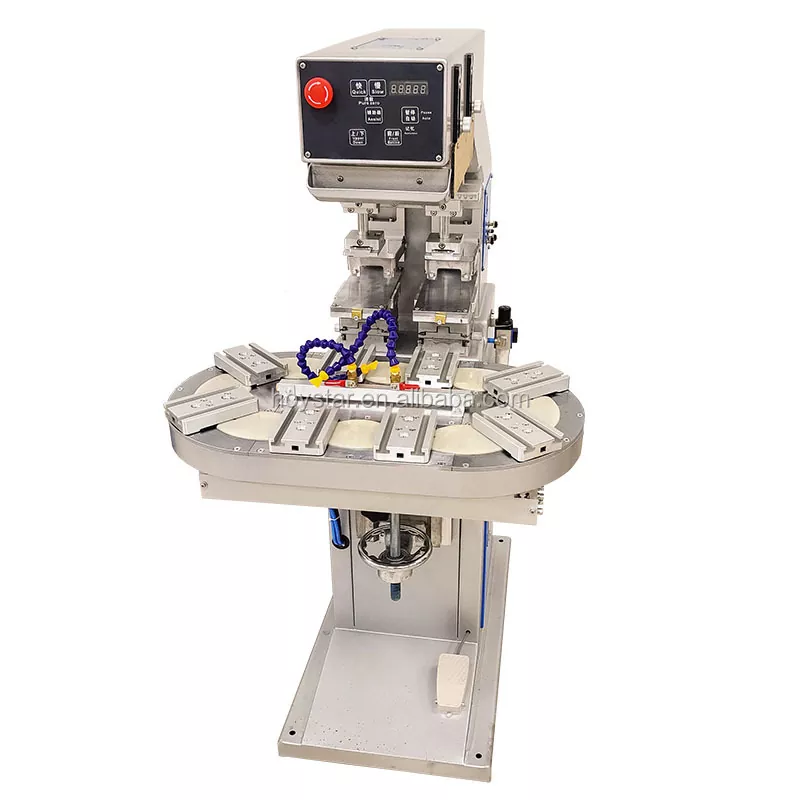
Registration accuracy is the single most critical quality metric in pad printing. When running a Two Color Rotary Table Pad Printing Machine for thousands of cycles, even a 0.1 mm drift can turn a batch of premium parts into scrap. At HOYSTAR, we have engineered our rotary systems to sustain micron-level precision across 8‑hour shifts, but machinery alone does not guarantee consistency. This guide delivers a professional, field‑tested framework for preserving registration accuracy on a Two Color Rotary Table Pad Printing Machine during extended production runs, combining operator discipline, preventive maintenance, and environmental control.
The Core Challenges of Long‑Run Registration
Unlike single‑station machines, a rotary table introduces multiple variables: indexing repeatability, pad compression decay, ink viscosity shift, and thermal expansion of tooling. Over 10,000 impressions, these factors accumulate. The table below maps the primary drift sources and their typical contribution to misregistration.
| Drift Source | Typical Contribution to Misregistration | Detection Method |
|---|---|---|
| Indexing mechanism backlash | 0.05 – 0.12 mm | Dial gauge on fixture plate |
| Pad hardness change (heat + fatigue) | 0.08 – 0.20 mm | Shore A durometer check every 2 hrs |
| Ink solvent evaporation (viscosity rise) | 0.10 – 0.25 mm | Zahn cup #4 viscosity test |
| Thermal expansion of pallets | 0.03 – 0.08 mm per 10°C | Infrared temperature monitoring |
| Clamping pressure variation | 0.06 – 0.15 mm | Pressure gauge log |
Step‑by‑Step Maintenance Protocol for Registration Stability
1. Indexing Table Verification (Every 500 Cycles)
The rotary indexer is the heart of your Two Color Rotary Table Pad Printing Machine. Use a precision dial indicator mounted on the base plate to measure the radial and axial runout of each station. At HOYSTAR, we recommend a maximum allowable runout of 0.02 mm. If deviation exceeds this, adjust the cam follower preload and re‑grease the Hirth coupling. Log every measurement in a bound register – this data becomes your early‑warning system.
2. Pad Condition and Compression Control
Silicone pads soften as they absorb solvent and heat from friction. A pad that is too soft distorts during compression, shifting the second color relative to the first. Replace pads when Shore A hardness drops by 5 points from the baseline. Additionally, standardise your compression stroke depth – do not alter it to compensate for ink thickness. HOYSTAR offers colour‑coded pad hardness kits that allow quick visual verification of correct durometer for each job.
3. Dynamic Clamping Force Standardisation
Workpiece holders (pallets) must exert consistent force on every index. Fluctuating clamping causes parts to sit at slightly different heights, altering the transfer gap. Install a digital pressure sensor on your pneumatic clamping circuit and set a visual alarm for deviations beyond ±0.2 bar. Re‑torque all fixture bolts with a calibrated wrench at the start of each shift – this single action eliminates up to 40% of registration complaints.
4. Environmental Stabilisation
Temperature and humidity directly affect ink tack, pad swell, and aluminium tooling dimensions. Keep your Two Color Rotary Table Pad Printing Machine in a room controlled to 22°C ± 2°C and 50% ± 5% relative humidity. Install a small data logger near the rotary table and review the 4‑hour trend. If you see a 3°C rise, pause production and allow thermal equilibrium to return – chasing output during thermal drift always costs more in rework.
5. Ink Viscosity Management with Automated Replenishment
Manual ink addition introduces human error. For long runs, retrofit your Two Color Rotary Table Pad Printing Machine with a closed‑loop viscosity controller that adds solvent in micro‑doses based on real‑time Zahn cup readings. HOYSTAR’s optional IVS‑200 system maintains viscosity within ±0.2 seconds, ensuring the ink film thickness – and therefore the transferred image size – remains constant throughout the shift.
Two Color Rotary Table Pad Printing Machine – FAQ
Q1: What is the most common cause of registration drift on a Two Color Rotary Table Pad Printing Machine during the first 1,000 cycles?
A1: The most common cause is incomplete thermal stabilisation of the machine frame and tooling. When the Two Color Rotary Table Pad Printing Machine starts from a cold state, the steel index table, aluminium pallets, and cast‑iron base expand at different rates. This differential expansion shifts the relative position of each station. The solution is a mandatory 30‑minute warm‑up period with the indexer running at production speed but without printing. During this warm‑up, cycle all pneumatic cylinders 50 times to equalise internal temperatures. At HOYSTAR, we also recommend using invar alloy locating pins for high‑precision jobs, as invar has near‑zero thermal expansion.
Q2: How often should I recalibrate the registration between the two colors on a Two Color Rotary Table Pad Printing Machine?
A2: Formal recalibration (using a test plate with crosshair marks) should be performed every 2,000 cycles, but we advise an intermediate visual check every 500 cycles using a 10x magnifying loupe. The critical action is not just recalibration – it is documenting the adjustment values. For each correction, record how many microns you moved the X‑Y‑θ micro‑adjustment knobs. If you find yourself making the same correction repeatedly, that indicates a mechanical wear issue (e.g., linear guide play) rather than a setup problem. HOYSTAR provides a digital calibration log template with our machines, which integrates with our predictive maintenance dashboard.
Q3: Can I use the same pad for both colors on a Two Color Rotary Table Pad Printing Machine to reduce setup time?
A3: No – this is a common but costly misconception. Each color requires its own dedicated pad because the first pad picks up residual solvent from the previous transfer, altering its surface energy. Using one pad for two colors on a Two Color Rotary Table Pad Printing Machine will cause the second color to spread unpredictably, destroying registration. Instead, use matched‑pair pads from the same batch and change them simultaneously. At HOYSTAR, we pre‑match pad sets and laser‑etch them with matching serial numbers so operators never mix mismatched durometers or geometries.
Final Checklist for Shift Supervisors
-
Verify indexing runout < 0.02 mm with dial gauge.
-
Confirm pad hardness within ±3 Shore A of baseline.
-
Record clamping pressure and ambient temperature.
-
Run 50 dummy cycles after any pad change.
-
Perform crosshair registration test every 2,000 cycles.
Why HOYSTAR Stands Apart
Our Two Color Rotary Table Pad Printing Machines are designed with dual independent servo drives for each color head, allowing real‑time positional compensation without stopping production. Combined with our patented tooling quick‑change system, you can switch between job families in under 8 minutes while retaining the same registration reference zero. Over 200 automotive and medical device manufacturers globally rely on HOYSTAR for 24/7 rotary pad printing operations.
Take Control of Your Long‑Run Quality Today
Registration accuracy is not a one‑time setting – it is a living process that demands systematic monitoring, disciplined logging, and responsive adjustments. The protocols above have been validated on HOYSTAR machines running over 50,000 cycles per week in Tier‑1 supplier plants.
Contact us now to schedule a free on‑site audit of your current rotary pad printing workflow. Our engineering team will measure your existing registration drift, provide a customised improvement plan, and demonstrate how a HOYSTAR Two Color Rotary Table Pad Printing Machine can reduce your misregistration rate to below 0.5%. Reach out via our website or call your regional HOYSTAR service centre – we respond within 4 business hours. Your next defect‑free run starts with one conversation.