

What Are the Most Common Troubleshooting Steps for a Jammed Cut Crease Demo Creasing Cutting Machine
2026-07-28
Encountering a jam on your Cut Crease Demo Creasing Cutting Machine can disrupt an entire production run, whether you are crafting custom packaging, prototyping rigid boxes, or scoring heavy cardstock for luxury invitations. The Adewo brand has engineered this machine for industrial-grade reliability, but even the best equipment occasionally faces material misfeeds, roller obstructions, or misaligned cutting plates. Understanding the root causes and systematic fixes not only saves time but also extends the lifespan of your Cut Crease Demo Creasing Cutting Machine. This guide delivers field-tested troubleshooting protocols, backed by mechanical logic and real workshop experience, to get your creasing and cutting back to flawless performance.
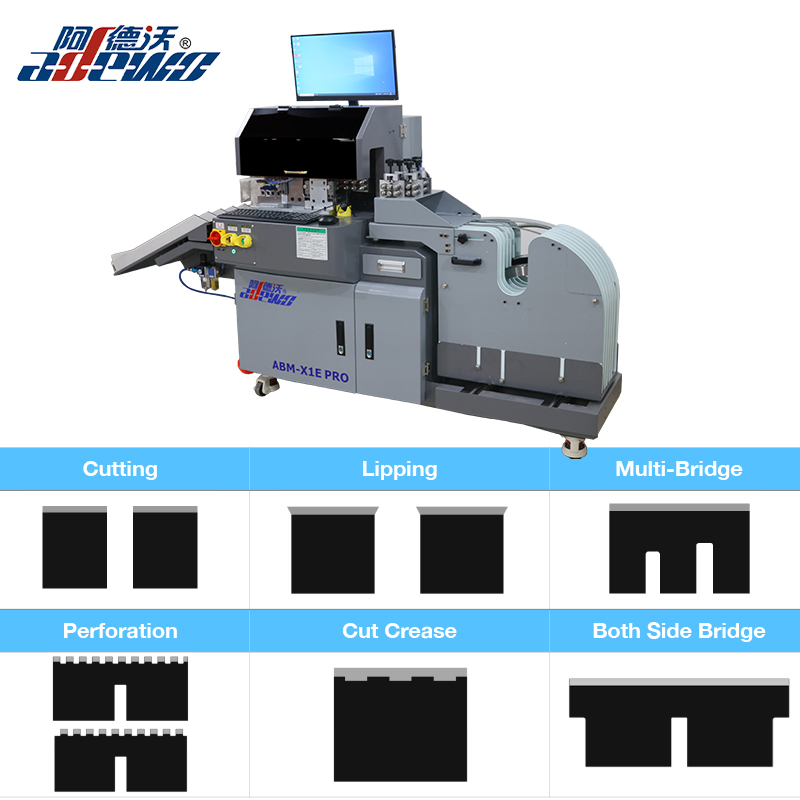
Initial Assessment: Stop, Inspect, Isolate
Before attempting any physical intervention, power off the Cut Crease Demo Creasing Cutting Machine and disconnect it from the mains. This safety-first step prevents accidental roller activation. Next, remove any visible material fragments from the feed tray and exit chute. The most common jam sources fall into three categories: over-thickness stacks, debris accumulation, and misaligned guide rails. Use the table below to quickly match your symptom with the primary cause.
| Symptom | Likely Cause | Urgency Level |
|---|---|---|
| Roller stops mid-feed with grinding noise | Material exceeds 2mm thickness or contains hard knots | High – stop immediately |
| Sheet feeds crooked then jams | Side guides are loose or unevenly tightened | Medium – adjust before next run |
| Crease line appears but cutter blade doesn't descend | Debris blocking the blade housing or worn spring mechanism | Low to medium – clean and test |
| Machine vibrates heavily during operation | Foreign object (screw, staple) trapped between rollers | High – full disassembly may be required |
Step-by-Step Troubleshooting Protocol
1. Clear the Roller Gap
The roller nip is the most frequent jam point. Rotate the manual adjustment wheel (located on the right side of the Cut Crease Demo Creasing Cutting Machine) counterclockwise to increase the gap to its maximum setting – usually 3.5 mm. Gently pull the jammed material straight out in the direction of feed. Never pull backward, as this can bend the creasing anvil. For stubborn jams, use a wooden spatula to coax the sheet edge, never metal tools that could score the roller surface.
2. Inspect and Clean the Cutting/Creasing Plates
Remove the upper and lower plates. Wipe each plate with a lint-free cloth and isopropyl alcohol to remove adhesive residue or paper dust. Check for burrs on the creasing rule – even a 0.1 mm deformation can cause uneven pressure and subsequent jams. The Adewo maintenance kit includes a ceramic honing stone specifically for this purpose; lightly pass it over the rule edge at a 15° angle.
3. Verify Drive Belt Tension
Open the side access panel (refer to your Cut Crease Demo Creasing Cutting Machine manual for screw locations). The timing belt should deflect no more than 5 mm when pressed with moderate thumb force. If it feels loose, tighten the idler pulley bolt by a quarter-turn. Over-tensioning is equally harmful – it strains the motor and causes intermittent stopping that mimics a jam.
4. Reset the Electronic Torque Sensor (if equipped)
Newer Adewo models include an overload protection sensor. After clearing the physical obstruction, press and hold the reset button (marked with a circular arrow) for 8 seconds until the LED flashes green. Run a single sheet of 200 gsm paper as a test – if it passes smoothly, the system has recalibrated its torque curve.
Preventive Maintenance Schedule
Adopting a routine prevents 80% of jams before they occur. The table below outlines the Adewo-recommended intervals.
| Task | Frequency | Tools Required |
|---|---|---|
| Clean roller surface with rubber rejuvenator | Every 8 operating hours | Rubber cleaner, microfiber cloth |
| Check blade sharpness (cut test on 300gsm) | Daily start-up | Sample stock, digital caliper |
| Lubricate drive chain and pivot points | Weekly (40 hours) | Food-grade PTFE spray |
| Calibrate side guide parallelism | Monthly | Feeler gauge set |
| Replace creasing strip (if worn) | Every 50,000 cycles | Adewo genuine replacement strip |
Frequently Asked Questions (FAQ)
Q1: My Cut Crease Demo Creasing Cutting Machine jams only when using recycled cardstock. Why does this happen, and how can I fix it?
A: Recycled fibers are shorter and produce more dust, which accumulates on the feed rollers, reducing friction. This causes the sheet to slip and skew, eventually jamming against the side guides. The solution is twofold: (a) increase the roller gap by 0.2 mm above your standard setting to accommodate the rougher surface, and (b) install the optional Adewo anti-dust filter over the air intake vent. Additionally, wipe the feed rollers with a damp cloth (water only) every 50 sheets during a recycled-stock run. For persistent issues, switch to a lower-feed-speed setting – the Cut Crease Demo Creasing Cutting Machine has three speed presets; use preset 1 (slowest) for recycled materials.
Q2: After clearing a jam, the machine makes a clicking noise and refuses to start. What should I check first?
A: The clicking sound almost always indicates that the emergency stop micro-switch has not fully re-engaged. This switch is located beneath the front safety cover. Open and firmly close the cover – you should hear a distinct "snap." If the click persists, inspect the switch actuator arm; it may have bent during the jam. Use a flathead screwdriver to gently realign it so that it makes perpendicular contact with the cover latch. Next, check the thermal overload breaker (a small red button near the power cord) – press it to reset. If both steps fail, the motor driver board may have tripped; power off for 10 minutes to allow capacitors to discharge, then restart. The Adewo technical team reports that 90% of post-jam start failures are resolved by these two actions alone.
Q3: Can a jam permanently damage the creasing anvil on my Cut Crease Demo Creasing Cutting Machine, and how do I test for that?
A: Yes, a severe jam – especially one involving metal staples or thick acrylic – can dent the anvil. To test, run a clean sheet of 400 gsm board through with no cutting rule installed. Examine the crease line under good light; if you see intermittent shallow or skipped sections, the anvil has a flat spot. Minor dents (depth < 0.1 mm) can be compensated by increasing pressure by one full turn on the adjustment dial. For deeper damage, rotate the anvil to an unused segment – the Adewo anvil has three indexed positions. Mark the damaged zone with a permanent marker to avoid future use. If all positions are worn, order a replacement anvil (part #ADW-ANVIL-3) – installation takes under 15 minutes and restores factory-grade crease consistency.
When to Call a Professional
If you have performed all the above steps and the Cut Crease Demo Creasing Cutting Machine still jams on every third sheet, the issue may lie in the main gearbox or the electronic synchronization board. These components require factory-level calibration. Attempting DIY repairs on the gear train voids your warranty and risks permanent misalignment.
Contact Us for Expert Support
Your production line deserves zero unplanned downtime. The Adewo service network offers same-day remote diagnostics and 48-hour onsite intervention for critical failures. For jam-related emergencies, spare parts inquiries, or to schedule a preventive maintenance audit, reach out to our technical support desk via the live chat on our official website or email us directly at [email protected]. Please include your machine’s serial number and a short video of the jam behaviour – our engineers will respond with a tailored resolution within 2 business hours. Keep your Cut Crease Demo Creasing Cutting Machine running at peak efficiency – contact Adewo today and let our expertise safeguard your craftsmanship.